Update One Balance Account Billing Details
ShippingEasy processes all One Balance purchases through Stamps.com. It is easy to update your One Balance account to add a new credit card or change your billing address.
-
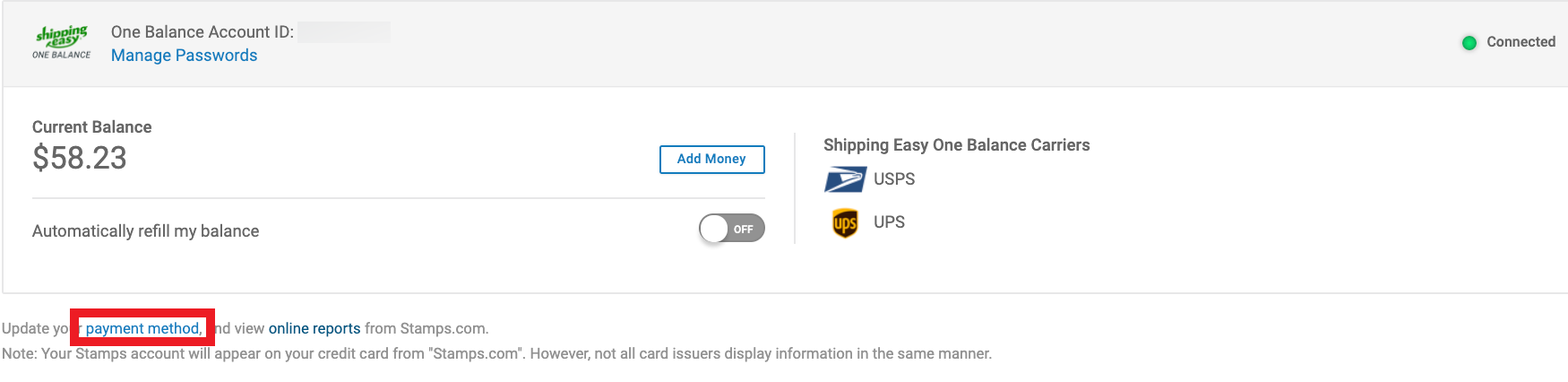
Click Payment Method under your One Balance account. This will take you to your Stamps.com account's Payment Methods page.
-
Choose to Add a new CC, Edit the existing CC, or Delete an entry.

-
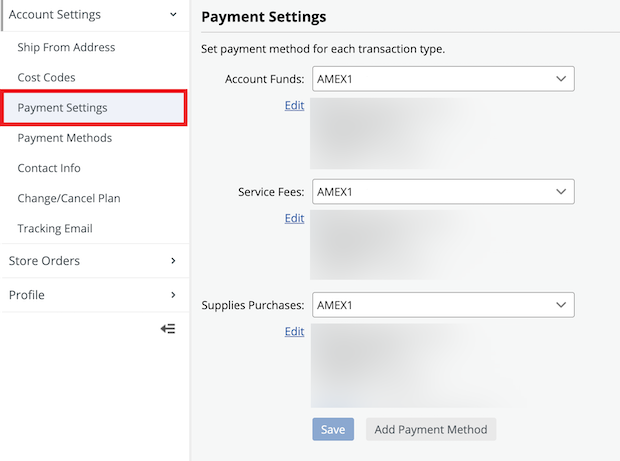
Go to Payment Settings to select the designated card from the dropdowns. Click SAVE.

You are done! ShippingEasy One Balance will now use your updated information when billing you for label purchases.
Comments
unable to updated, keep getting an error
I have tried for 2 days now to purchase labels so I can ship out customer orders. it keeps giving me an error to update, I have done that several times and is still not working. Someone from here was supposed to call me yesterday and still have not done so.
Add a Comment
Please sign in to leave a comment.
Tags:- #pendo
-
- problem
-
- usps
-
- payment
-
- rates
-
- expedited
-
- login
-
- endicia.com
-
- first class
-
- settings providers usps_accounts edit
-
- postage
-
- answerbot_article_public
-